This portfolio is password protected. Enter the password to continue.
Incorrect password. Please try again.
Amazon Alexa · 2024 & 2026
Overview
Timeline
Design 3 weeks May 2024 - 2025 (paused) Feb 2026 - Ongoing (resumed)
My role
Lead designer User researcher
Scope
Template creation Conversational AI Multimodal interaction design System architecture integration
Team
Alexa experiences
Tools
Figma Figjam Claude
Solution
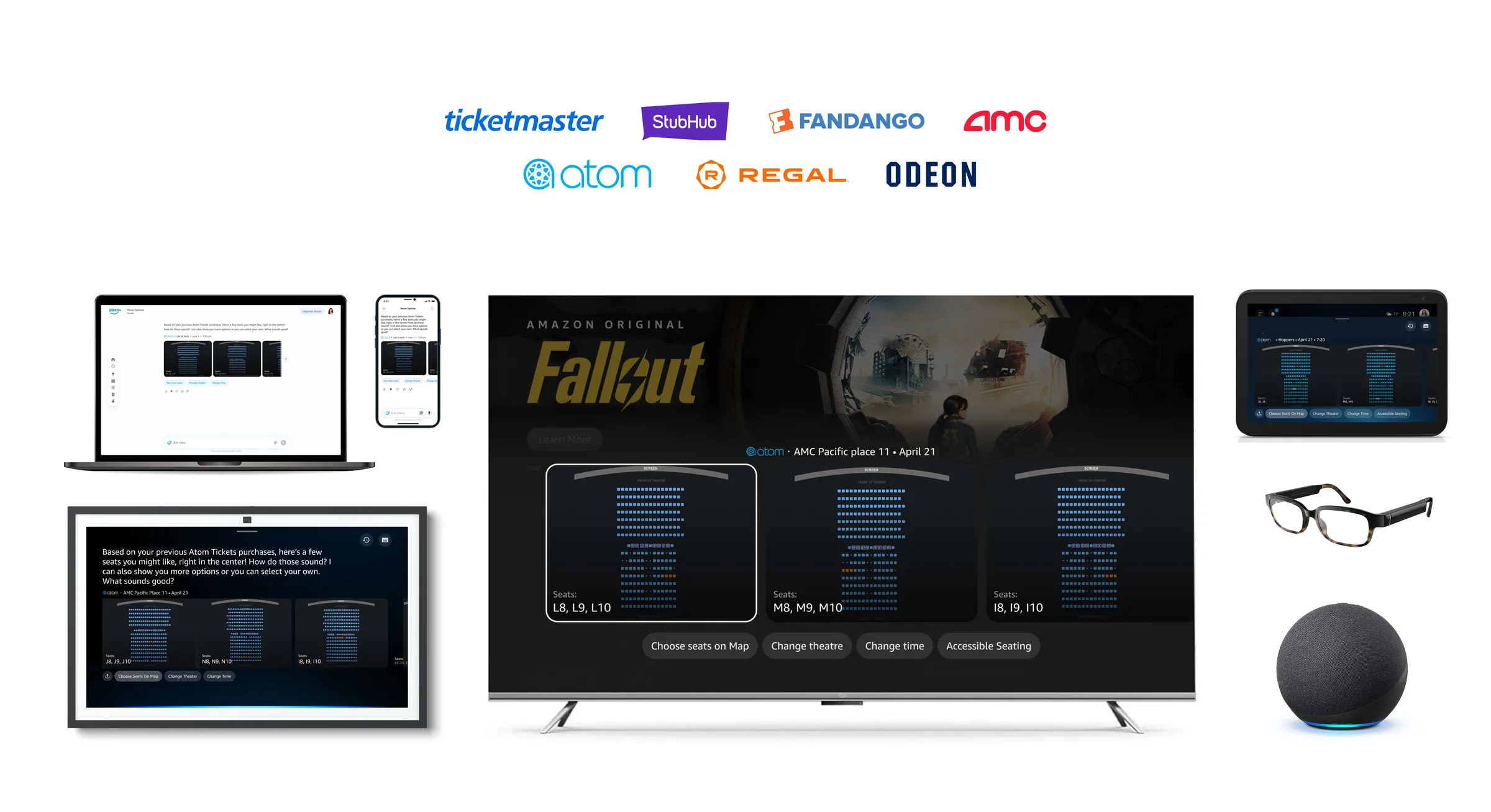
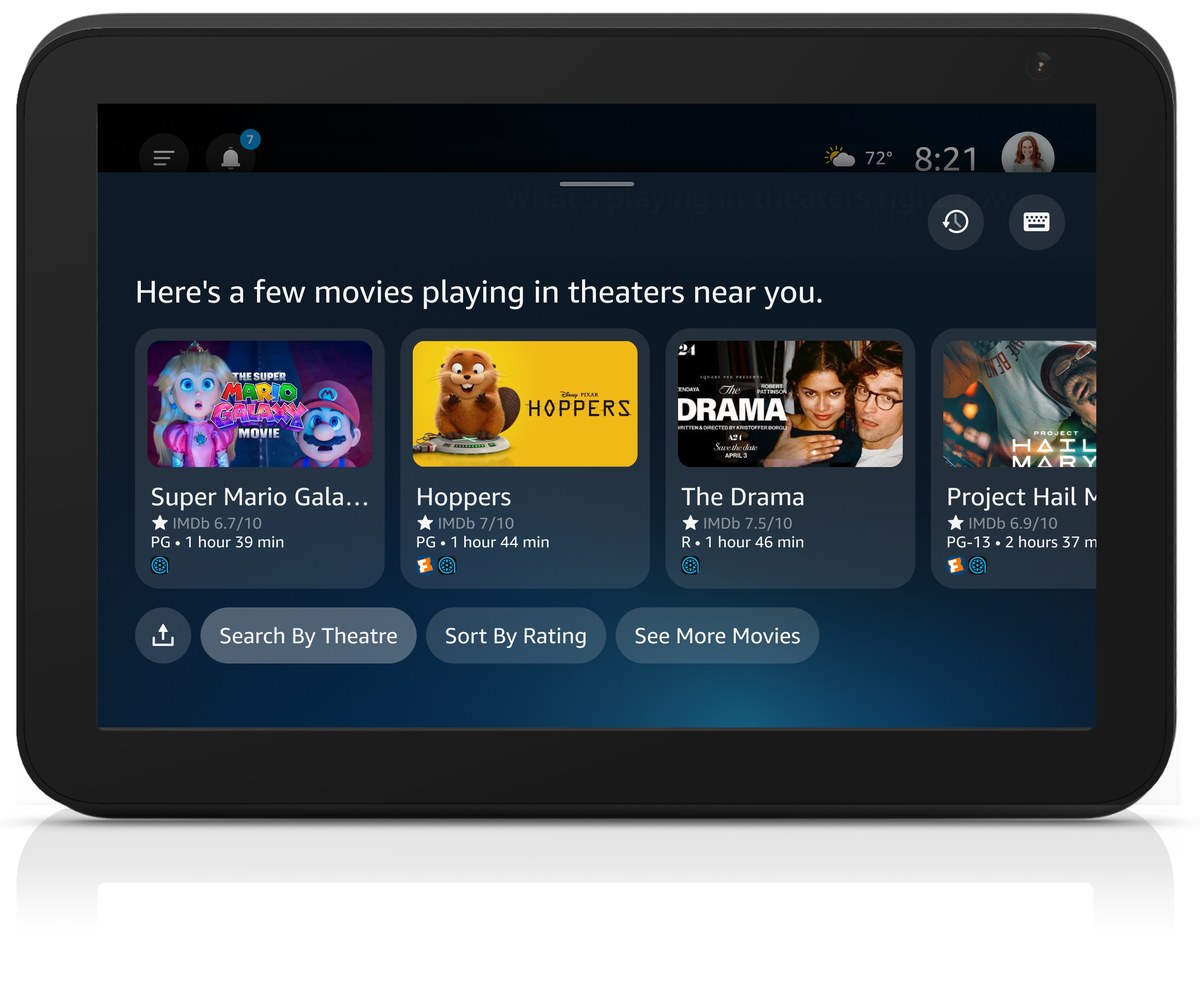
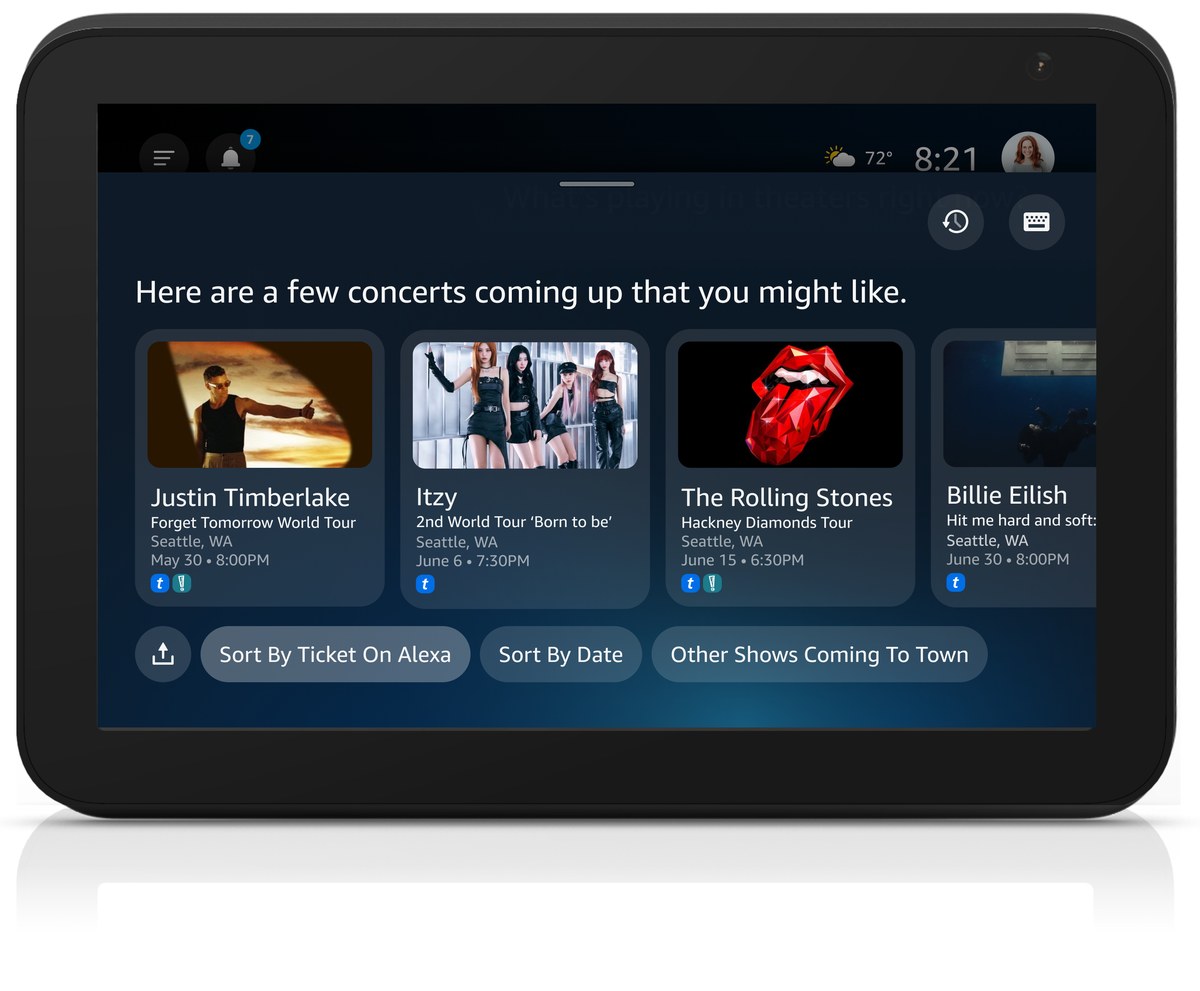
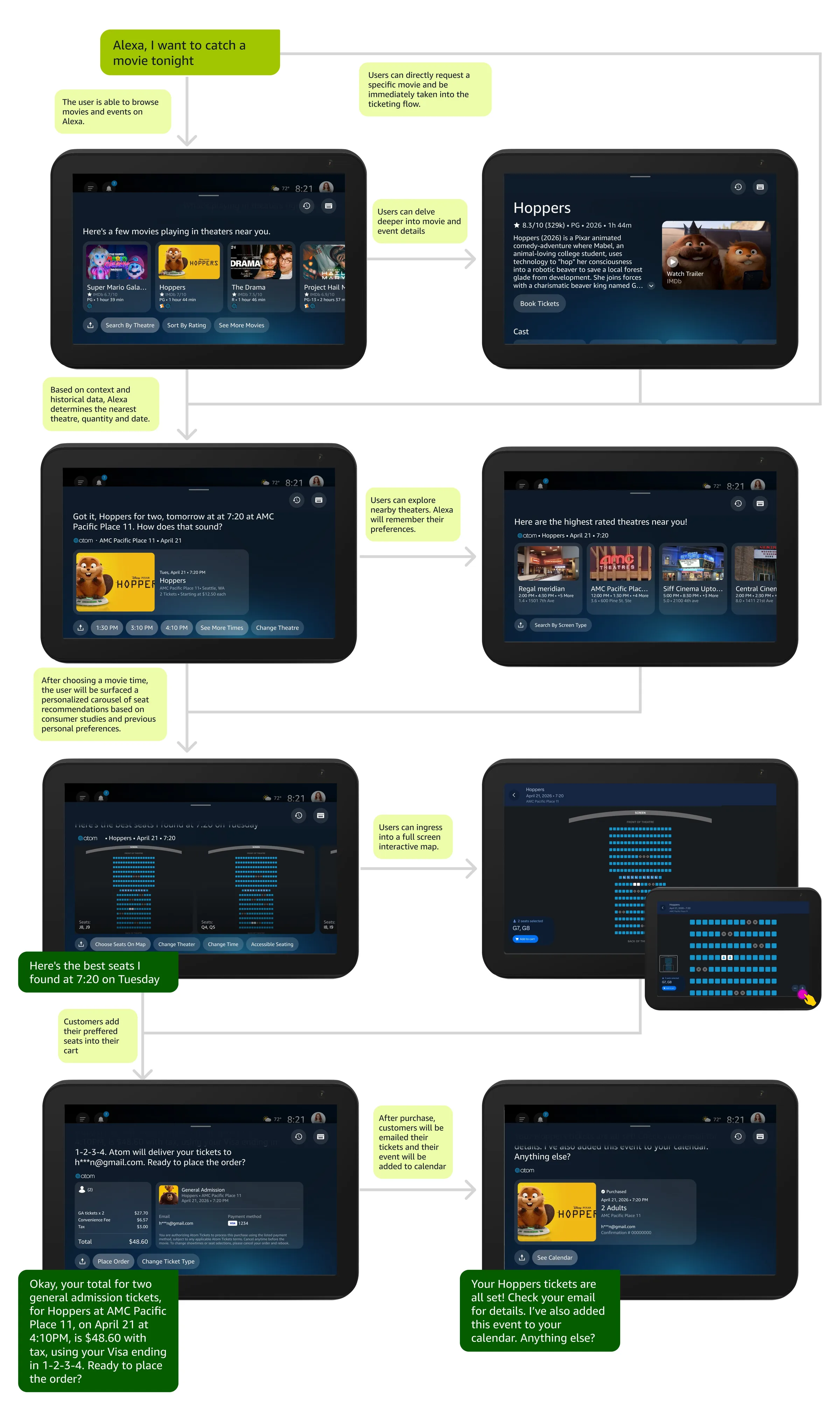
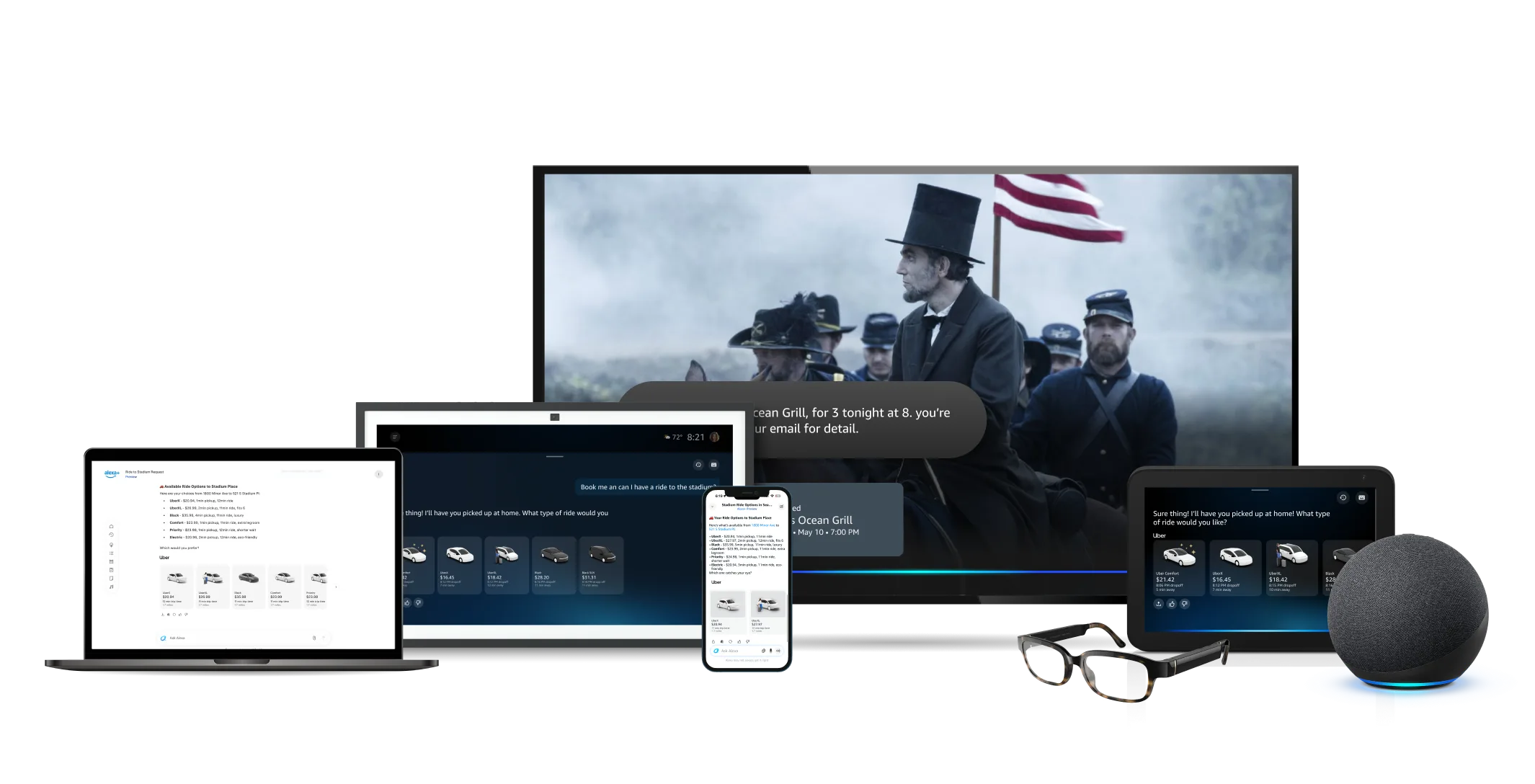
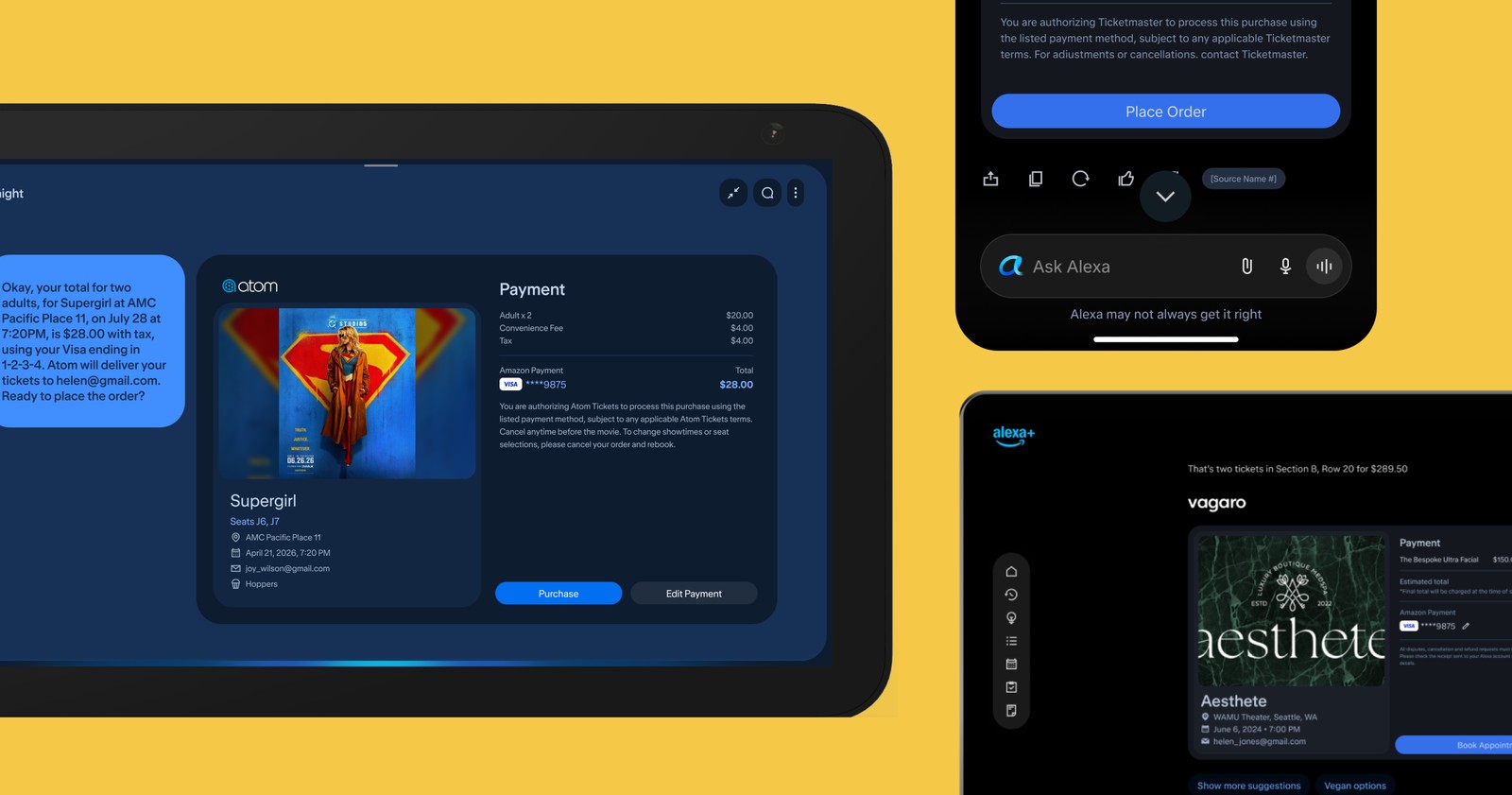
Movie and event ticketing on Alexa+ marked a key shift in voice commerce, moving ambient devices from simple answer engines into reliable booking tools. Although movie and event ticketing started as two separate design initiatives, auditing the user flows uncovered identical underlying mechanics at their core: discovery, selecting showtimes, choosing seats, and checkout. Rather than maintaining parallel systems for each vertical, I consolidated both interactions into a single, flexible design template. This shared model easily handles catalog variations across different entertainment types, whether someone is watching the latest movie or securing tickets for their favorite artist, keeping the conversation fast, predictable, and straightforward.
Better discovery, smarter seat selection, checkout that gets out of the way.
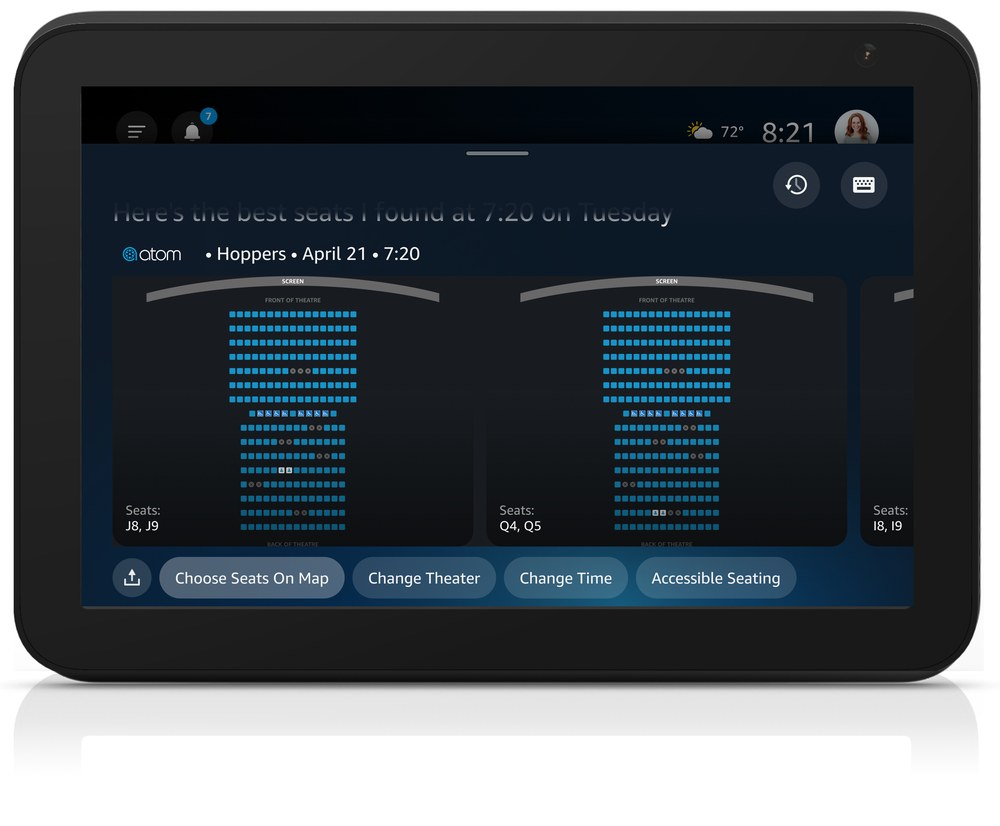
By pulling in location data, third-party event research, and past preferences, Alexa+ turns finding and buying tickets into a fluid conversation. Rather than making users dig through endless catalogs, the assistant suggests relevant local shows and automatically picks out the best seats based on their tastes. I designed the core experience and integrated it with underlying interaction logic to streamline complex booking steps, taking users from discovery to checkout in seconds.
Impact & Key Achievements
Industry-Standard Conversion Rate: The feature reached an organic conversion rate of nearly 3%, putting it on par with Ticketmaster's primary web and mobile benchmarks, with room to exceed them. That's a strong signal that people trust ambient voice enough to complete high-stakes event purchases without any extra promotional push.
This also set a precedent for complex purchases on Alexa+, proving that high-friction transactions like seat selection can move out of a mobile app and into more conversational experiences.
The architecture turned out to be reusable, too: it handles Ticketmaster's complex venue structures cleanly enough that it's become a repeatable framework as new partners come on board.
Voice assistants handle basic requests easily, but complex, detail heavy purchases often add cognitive weight into multimodal interactions. Bringing movie and live event ticketing to Alexa+ meant turning heavy checkout flows into fast, natural interactions that offer alternatives to tedious steps like manual seat selection.
Heavy Friction
Browsing showtimes, comparing prices, and clicking through venue maps slowed down booking.
Seating Sensitivity
People are highly selective about where they sit, so the assistant needs to recommend great seats upfront to earn user trust without relying on forced seat map selection.
Fragmented Systems
Movies and live events ran on completely different catalog systems, threatening to break the experience into inconsistent, event specific interactions.
Research and Testing
Objective
Understand Decision Control
Determine how much decision-making authority users want to delegate to an AI agent during a high-stakes ticket purchase.
Validate Hybrid Interactions
Evaluate whether an automated-only seating recommendation engine causes user drop-off compared to an interactive hybrid model.
Uncover Real-World Seating Behaviors
Identify psychological, spatial, and social factors that influence seating choices across moviegoers and event attendees.
Methodology and Approach
To better understand movie ticketing and help inform requirements, I led a three part research plan combining secondary behavioral literature, a large-scale quantitative prototype study, and iterative RITE usability sessions.
Session Protocol
01
Literature Review
We reviewed academic research on consumer psychology, spatial seating habits, and ticket pricing models.
02
Quantitative Prototype Study
I ran an unmoderated study with 64 moviegoers testing a Claude-powered web agent (via Qualtrics and UserTesting) across high-availability and constrained-inventory scenarios, using both voice commands and touch on the seat map.
03
Ticketmaster RITE Study
I ran 3 RITE cycles with 8 power users on next-gen Alexa, testing cart persistence, price overlays, and payment privacy. After each testing session, I updated the prototype until every critical issue was resolved.
Research & Validation: Balancing AI Automation with Human Agency
Strategic Problem & Research Philosophy
Designing the first conversational commerce experience on Alexa+ meant confronting a real tension in multimodal UX: figuring out how much decision-making authority users actually want to hand over to an AI agent during a high-stakes purchase.
External ticketing partners initially wanted to forgo selection entirely and pushed for a fully automated recommendation engine to speed up checkout. My hypothesis was different: seating preferences are personal, contextual, and change with every purchase. Full automation risks eroding trust, especially for group bookings, tight inventory, or high-value events.
To settle it, I led a three-part research effort: a literature review, a large-scale quantitative prototype study, and iterative RITE usability testing.
Part 1: Understanding How People Pick Seats
Before prototyping, I reviewed academic literature and market research to understand what actually drives seating choices.
Key Insights
The "togetherness effect" vs. seat quality: Consumer psychology studies (Journal of Consumer Psychology) show that group shoppers regularly sacrifice viewing quality for proximity. Over 50% of patrons choose adjacent back-row seats over separated front-row upgrades to stay together. Algorithms that split up a group's seats to optimize viewing angle work against what people actually expect.
Spatial seating habits: Research in Laterality found a real rightward seating bias in movie theaters, tied to right-handed entry habits. Seating choices also shift with how full the venue is: when theaters are empty, people spread out for personal space; once it is over 80% full, they prioritize aisle access and screen proximity instead.
Why tiered pricing failed: AMC's abandoned Sightline program showed that even though younger audiences (52% of Gen Z, 54% of Millennials) say they'd pay more for better seats, dynamic price tiering just added friction without changing behavior. Users still expected equal access to whatever was left.
Conclusion
Seating preferences aren't something a single static algorithm can calculate. Group cohesion, lateral bias, and personal space shift with every trip, so the assistant needs to support flexible manual overrides.
Autonomy Beats Pure Speed: Academic and behavioral research confirms that seating choices are deeply personal, social, and contextual. Automated recommendations that split groups or optimize solely for speed violate fundamental human expectations.
Control Preserves Trust: While algorithms can streamline the decision-making process, preserving user agency, through clear visual seat map access and manual override options, is essential for building trust in agentic commerce.
Part 2: Quantitative Study Using a Live Prototype
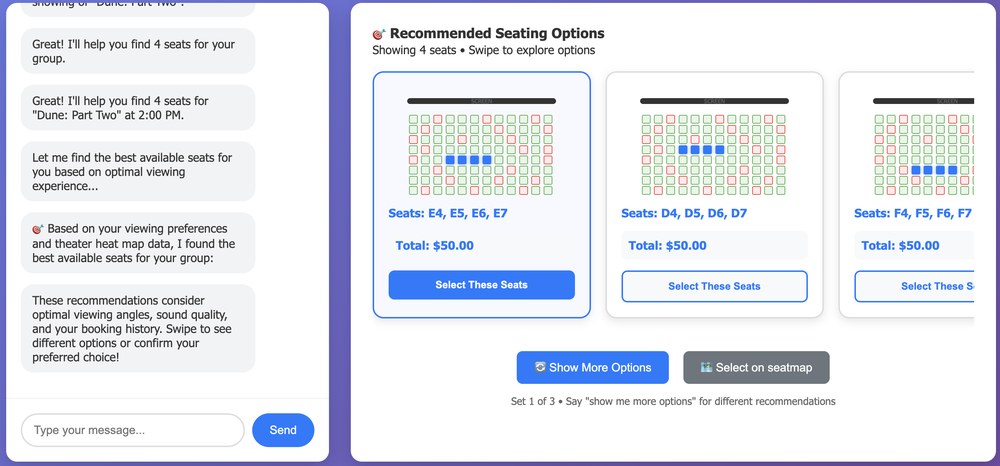
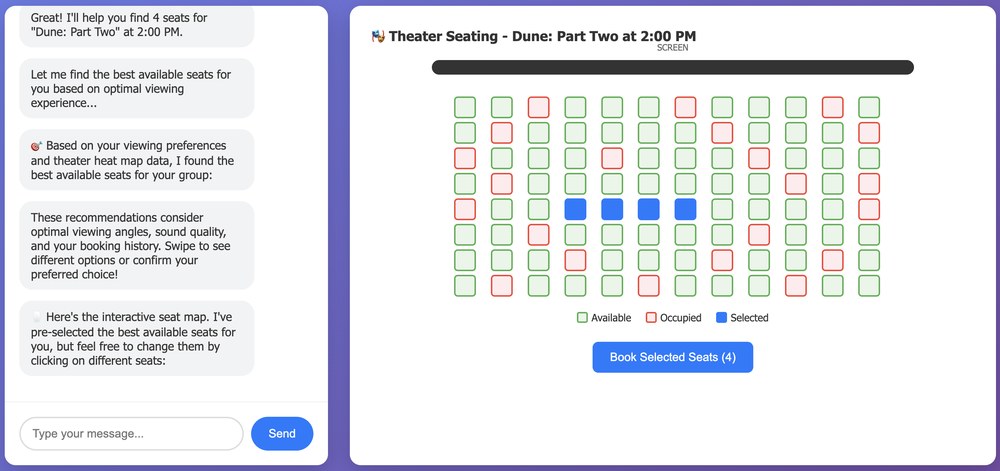
To test automated recommendations against a hybrid model in a live environment, I built a conversational web prototype and ran an unmoderated study with 64 moviegoers through Qualtrics and UserTesting.
The prototype was run on a production-grade stack that enabled an ambient, conversational interaction. The prototype was based on an experience that closely mirrored the hypothesized CX.
Experimental Design
I tested two design variants across two inventory conditions (four combinations in total), with presentation order rotated to rule out bias:
Prototype A: Had plenty of seats, but only access to recommended seats
Prototype B: Had plenty of inventory with recommended seats and access to a seat map
Prototype C: Had few seats and only access to recommended seats
Prototype D: Had few seats with recommended seats and access to a seat map
The "Plenty" scenario tested whether users still wanted visual seat map controls when ~80% of prime center seats were open and the AI's default pick was already ideal.
The "Few" scenario evaluated user trust under heavy inventory constraints (only 16 scattered edge seats remaining), revealing that when all options are poor, users strongly demand map access to weigh trade-offs themselves.
Prototype
Inventory level
Recommended seats
Seat map access
A
Plenty
✓
✗
B
Plenty
✓
✓
C
Few
✓
✗
D
Few
✓
✓
Seat Selection Flow
Testers were asked to go through a user flow from picking the movie, times, quantity, and were shown seating recommendation as well as the option to open a full screen map depending on the prototype they are assigned.
Key Insights
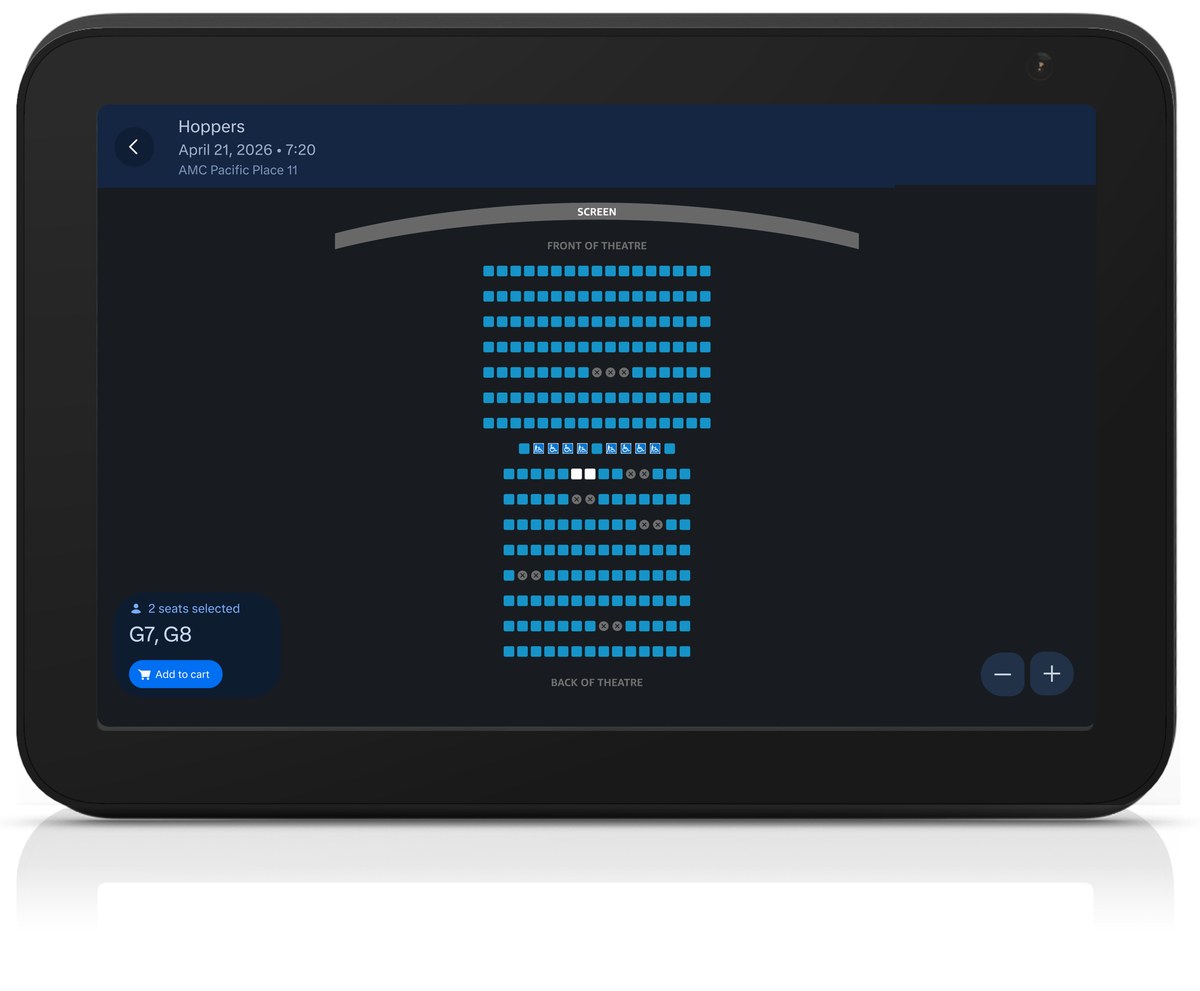
The seat map is a safety net (72% acceptance): When we highlighted the AI's top pick on a visual map, 72% of people bought those exact seats without changing a thing. Just knowing they could check the map gave them the confidence to trust the assistant and check out.
People hate a "black box" (68% rejection): When we took away the map and forced users to rely entirely on the AI, nearly 68% of people rejected the experience. Satisfaction crashed from 4.44/5 down to 2.64/5. Users flat-out refused to hand total control over to an algorithm.
Some people just want the final say (~28% override rate): No matter how good the AI's recommendation was, or how many seats were left in the theater, about 1 in 4 users manually changed their seats. People always want the autonomy to tweak the results based on personal quirks the AI can't know.
Trust breaks down when options are bad (15% drop in match quality): When the theater was mostly sold out, people rated the AI's picks 15% worse. If the remaining seats are terrible, people get anxious letting an AI decide for them. They want to see the map so they can weigh the trade-offs (like sitting too close vs. sitting on the edge) themselves.
Users expect the map to listen: People didn't just want to tap the screen; they instinctively tried to steer the map with their voice, expecting commands like "Get us closer to the screen" or "Find something near the aisle" to update the UI in real time.
Part 3: Ticketmaster RITE Testing (Live Event Affordances)
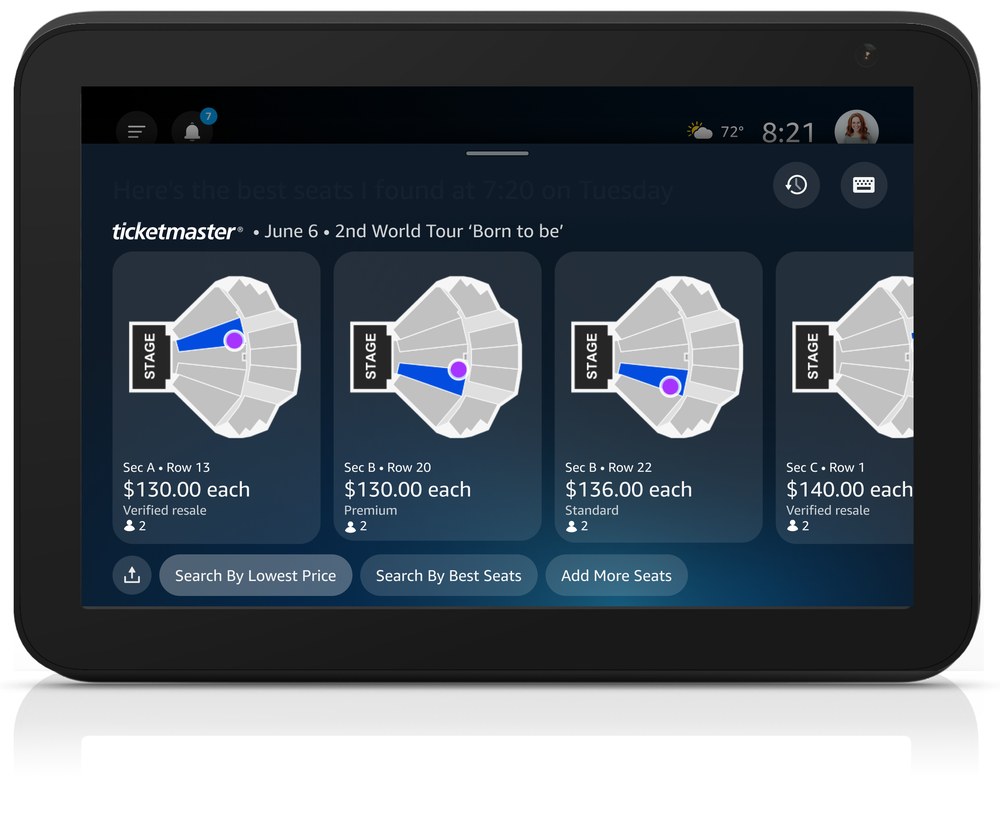
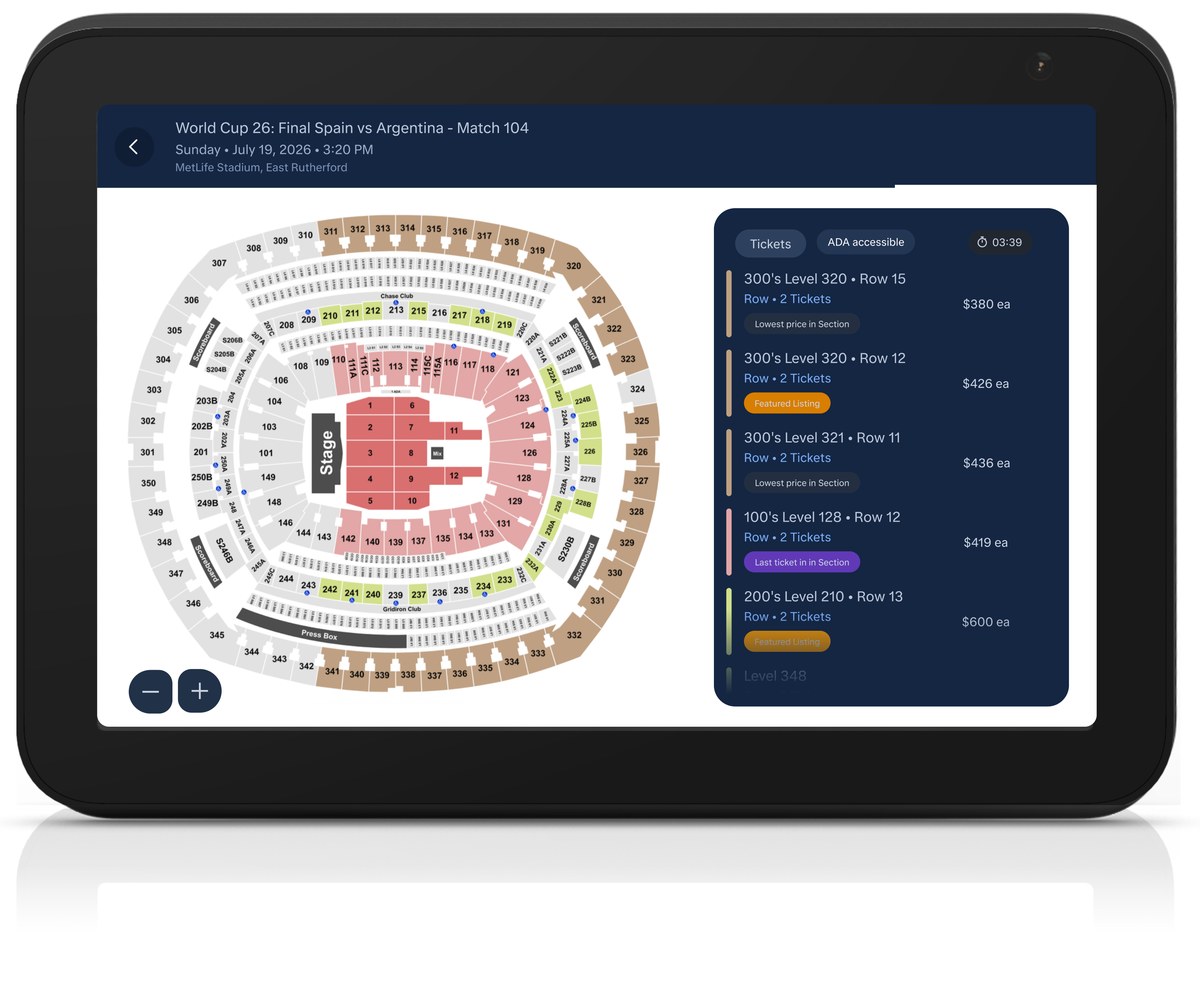
To optimize live event ticketing on Alexa+, we conducted a Rapid Iterative Testing & Evaluation (RITE) study with 8 power users across three prototype cycles. The goal was to solve seating selection friction on large stadium maps and refine spatial interaction logic. Key iterations resolved user anxiety around seat holds during cart edits, added price-by-location overlays for better stage context, and introduced immediate visual feedback for spatial voice commands like "Show me sections closer to the stage."
Participant Screening
Frequent Event-Goers: Active live event attendees buying tickets 3+ times a year.
Smart Display Users: Familiar with voice assistants and multimodal devices.
Group Bookers: Users who coordinate multi-ticket purchases where proximity and view quality matter.
Tasks: Tested real-time voice and touch interactions for arena seat maps, adding tickets to active carts, and spatial voice steering.
Key Findings: Ticketmaster RITE Usability Study
Abstract venue dots cause "view anxiety": Simple section dots on stadium maps didn't convey actual stage distance or view quality. We introduced mid-range price sorting alongside "Cheapest" and "Best Available," plus price-by-location overlays to help users weigh cost against proximity to the stage.
Cart resets destroy user confidence (50% anxiety rate): When adding another ticket to an existing selection, half of participants worried the system would drop their held seats. We updated the inventory logic to lock held seats in place while searching for adjacent availability.
Event context builds selection confidence: Before confirming seats, users needed explicit visual and conversational grounding, confirming the event date, venue layout, and section view, to feel confident moving forward with high-stakes live events.
Spatial voice navigation needs clear visual feedback: When steering seat maps by voice (e.g., "Show me sections closer to the stage"), users required immediate, high-contrast visual highlighting on the map to confirm the assistant correctly understood their spatial request.
Overall Conclusions
People don't want AI making decisions for them, they want AI helping them decide. Across our literature review, prototype testing, and usability sessions, one truth kept surfacing: seat selection is deeply personal. Forcing a "black box" automated choice creates friction and anxiety. AI thrives when it filters overwhelming choices, not when it takes away the steering wheel.
Providing a safety net drives adoption of agent recommendations. When we paired the AI's top suggestion with an interactive seat map, 72% of users purchased those exact recommended seats without making a single change. Simply knowing they could inspect the map and override the system gave them the confidence to trust the AI's pick.
Visual feedback is what builds buying confidence. Whether steering a stadium map by voice or adding a seat to an active cart, users need real-time, unambiguous feedback that the system understands their intent. Speed matters, but spatial reassurance and total control are what actually push a user across the finish line.
Design Process
Cross-Org Collaboration
Shipping a first-of-its-kind multimodal ticketing experience meant syncing up closely across a wide network of internal teams and high-stakes external entertainment partners.
Internal Cross-Functional Partnership
Product Management: Partnered with PMs to turn research insights into concrete UX requirements, establishing a roadmap for voice-led seat selection and cart management.
Engineering & Solutions Architects: Worked hand-in-hand with engineering to build within legacy ticketing API limits and venue seat-map frameworks, adapting interactions smoothly as technical constraints evolved.
Design Systems: Teamed up with core system design teams to build new pattern libraries, interactive seating components, and spatial UI standards for ambient smart displays.
Legal & BizDev: Navigated third-party catalog compliance, partner data policies, and co-branding guidelines alongside legal and business development leads.
Business Development: Created pitch decks and interactive concept demos to secure partner buy-in, align contract terms, and expand the multimodal commerce ecosystem.
Marketing: Designed key visual assets and promotional scripts for launch campaigns and go-to-market storytelling.
Quality Assurance: Beyond hands-on testing, partnered with QA to build comprehensive test suites covering edge cases like sold-out shows, split-group seating, and cart timeouts.
Executive & Product Alignment: Led regular syncs with partner product leads, engineering directors, and design counterparts to align on feature scope and data-sharing models.
API Integration & Ecosystem Handoff: Collaborated directly with external technical teams to ensure real-time venue map rendering, live inventory syncing, and smooth checkout handoffs across systems.
Key Decisions
01
Seat Recommendation Engine
A custom algorithm that rates seats based on view angles, screen distance, party size, and past preferences so we don't have to rely on partner feeds that surface a single pick and completely randomize the rest.
Pros
Replaces unpredictable, semi-random partner inventory feeds with a smart, reliable scoring system.
Creates a consistent, high-quality seat recommendation experience across different platforms like Fandango and Ticketmaster, which builds user trust.
Cons
Required building and maintaining complex scoring logic from scratch instead of relying on simple partner API payloads.
Adds a tiny bit of processing time up front to calculate and score the theater layout in real time.
02
Interactive Seat Maps
An interactive seating map shows full venue availability but only surfaces AI recommendations when needed, keeping simple layouts like movie theaters lightweight while guiding users through complex venues like stadiums.
Pros
Combines direct user control with smart recommendations, giving users a visual safety net that drove a 72% acceptance rate in testing.
Reduces cognitive load and checkout anxiety in large venues by showing people the seats directly instead of asking them to trust a "black box" audio recommendation.
Cons
Takes up significant screen space on screens.
Needs extra logic to understand what customers want when using adjectives (e.g. closer, further, better, best).
03
Group Integrity-First Allocation Logic
Smart seat selection that prioritizes keeping groups together in the same row, even if it means picking seats slightly off-center.
Pros
Directly addresses core RITE study findings by keeping party members together in unbroken rows, fixing a primary friction point for group bookers.
Solves a major cause of seat selection frustration by preventing the AI from making automated picks that split groups up.
Cons
Requires the algorithm to accept slightly lower view-angle scores when prime center blocks are full, occasionally compromising individual line-of-sight.
Limits optimal automated suggestions for larger parties in high-demand, near-capacity venues where contiguous blocks are scarce.
04
Unified Commerce Pattern & Architecture System
A flexible interaction framework that aligns movie and live event ticketing under a shared pattern, while adapting the meta data to fit each use case.
Pros
Builds a familiar flow for both cinema and concert bookings, so returning users don't have to relearn how the assistant works.
Makes life easier for design and engineering by keeping conversational states, cart logic, and edge-case handling consistent across partners like Fandango and Ticketmaster.
Cons
Meant designing responsive layout variations that could handle massive differences in scale, from an intimate 100-seat theater to a massive 60,000-seat stadium map.
Added setup complexity on the engineering side to handle variable backend data.
Defining Success
Measuring success here meant looking past simple task completion. I framed it around three things that actually mattered: whether people trusted the AI's picks, how quickly they could get through the flow, and whether the system could scale across very different venues.
Trust in the AI's Picks
72% recommendation acceptance: Pairing the AI's seat scoring with an interactive map got people to buy the exact seats it suggested nearly three-quarters of the time. Showing the map, not just the pick, is what removed the friction.
Holding a user's selected seats in place while they added tickets also meant people could explore options without worrying they'd lose their spot — no more cart-reset anxiety.
Getting Through the Flow Faster
The end-to-end flow ended up noticeably faster than both multi-screen mobile checkout and older voice-only Alexa skills.
No need to ask what people want: For returning users, the system anchored to their past seating habits (like a strong aisle preference) automatically, skipping a round of questions entirely.
Scaling Across Venues and Partners
One pattern language that scales:The same interaction pattern held up from a 100-seat movie theater to a 60,000-seat stadium, with no venue-specific rebuilds.
It also had to normalize inconsistent inventory feeds from partners like Fandango and Ticketmaster into one predictable experience on Alexa+.
Final Design
Core Customer Experience
Recommendation Engine Logic & Experience Design
To deliver smart, human-centered seat recommendations on Alexa+, I translated behavioral seating preferences into a deterministic scoring framework paired with a conversational fallback strategy.
Hierarchy of Recommendation Logic
Explicit User Requests (highest priority): Direct voice commands ("Get us seats in the back" or "I need aisle seats") immediately override all default scoring and past preferences.
Personalized Historical Anchoring: If a user repeatedly picks specific seating profiles (e.g., choosing aisle seats over 70% of the time across past bookings), the algorithm anchors search vectors directly around their historical preferences.
Hard Constraints & Accessibility: Accessibility needs and companion seats are evaluated strictly as mandatory requirements rather than point adjustments.
"Optimum Zone" Baseline (cold start): For new users without past data, the engine defaults to center seats located 60–75% back from the screen (or 35–55% for recliner theaters).
Algorithmic Seat Value Scoring System
To evaluate available inventory programmatically, seats are calculated against a multi-variable value matrix:
Feature
Criteria
Point
View quality
Angle from seat to center of screen is closest to 0° horizontal offset
(+1.5)
Optimal zone
Seat rows fall within the 60-75% distance back from screen
(+1.0)
Group Priority
Successfully satisfies an unbroken group block (e.g. 4-in-a-row)
(+2)
Side Bias
If center is full prioritize the Right Side over the Left Side.
(+0.5)
Privacy buffer
1 empty seat between taken seats is available
(+0.5)
Front Penalty
Seat is located in the front 15-30% of the venue's rows.
(-1.5)
Lonely Seat Penalty
When there is single seat sandwiched between 2 taken seats
(-2.0)
Tie-breaker rule: When two options yield equal scores, the engine selects the row closer to the back of the auditorium.
Conversational Experience & Fallback Logic
Transparent Rationale: Every AI recommendation includes clear, plain-language reasoning (e.g., "Here are seats in row J that offer the best available viewing angle" or "Center seats were full, so I found the next best option in row J"), building user trust in the assistant's choices.
Graceful Rejection Handling: If a user rejects a suggestion, the assistant prompts for specific preferences ("Got it, which area were you thinking?").
Adaptive Learning Loop: If a user rejects recommendations twice in a row, the engine immediately drops the active recommendation logic to avoid repetitive suggestions and hands manual control back to the user.
Next Steps
Dynamic Price Tracking & Comparison: Have the scoring engine track price changes over time, compare tier options across vendors, and automatically apply promo codes, coupons, and loyalty points at checkout.
Post-Purchase & Event-Day Companion Mode: Shift the display into an event-day assistant once tickets are purchased, offering parking alerts, venue entry guidance, and mobile ticket handoff.
Shared Group Access: Allow users to send individual ticket passes to party members via SMS or companion app with a simple voice command, like "Alexa, send Sarah her ticket."
Morning-Of Briefing: Automatically switch the home screen to show key event details, including venue address, door times, parking passes, and the local weather forecast.
Proactive On-Sale & Presale Tracking: Monitor upcoming showtimes, ticket drops, and unexpected inventory restocks across partner platforms, alerting users through ambient display updates or a timely voice prompt before tickets go live.
Current Status
Event ticketing is live with Ticketmaster and expanding to new partners and features, while movie ticketing was officially announced and launched to beta customers with 2 partners in September 2026.